
CLAUDE.md: what it is, where it goes and best practices (with examples)
A complete guide to CLAUDE.md files in Claude Code: every location and load order, /init and /memory, @imports, path-scoped rules in .claude/rules, CLAUDE.local.md, auto memory, AGENTS.md, size limits, compaction, and what to put in the file (and what to leave out). With a real example and screenshots.
Every Claude Code session starts with an empty context window. CLAUDE.md is how it starts with knowledge instead: a Markdown file Claude loads at the beginning of every session, holding the things you would otherwise repeat every day. How to run the tests. Which package manager. The one directory nobody should touch.
This guide covers where the files go and in what order they load, the commands that manage them, path-scoped rules, imports, CLAUDE.local.md, auto memory and AGENTS.md, and then the part that matters most: what to put in the file and what to leave out. Facts are checked against Anthropic's Claude Code documentation on 27 October 2026; the screenshot is from Claude Code v2.1.307.
We are also heavy users ourselves. The repository behind this website has a CLAUDE.md that every session reads, and several of the practices below come from keeping it useful.
What CLAUDE.md is (and is not)
CLAUDE.md is plain Markdown. Claude Code reads it when a session starts and adds it to the context, right after the system prompt. There is no schema and no required section.
The single most important thing to understand: it is context, not configuration. Claude follows it the way a new colleague follows an onboarding document, usually and sensibly, but without a guarantee. If something must happen every single time, use a hook or a permission rule instead (see CLAUDE.md, hooks, skills or settings? below).
Where CLAUDE.md files live
| Location | Who it is for | Shared? |
|---|---|---|
| Managed policy file (set by IT) | Everyone in the organization | Deployed centrally, cannot be excluded |
~/.claude/CLAUDE.md | You, in every project | No |
./CLAUDE.md or ./.claude/CLAUDE.md | Everyone working on the project | Yes, commit it |
./CLAUDE.local.md | You, in this project | No, add it to .gitignore |
CLAUDE.md in a subdirectory | Work inside that folder | Yes |
The managed file lives at /Library/Application Support/ClaudeCode/CLAUDE.md on macOS, /etc/claude-code/CLAUDE.md on Linux and WSL, and C:\Program Files\ClaudeCode\CLAUDE.md on Windows.
How they load
- At launch, Claude Code loads the managed file, your user file, and every
CLAUDE.mdandCLAUDE.local.mdfrom the working directory and every directory above it. They are concatenated from the filesystem root down, so the file closest to where you started is read last. - On demand, a
CLAUDE.mdin a subdirectory loads the first time Claude reads or edits a file in that folder. It is not there at the start. - Nothing overrides anything. All files are combined. If two files contradict each other, Claude may follow either, so remove contradictions instead of relying on order.
- HTML comments are stripped before the file reaches Claude, so
<!-- notes for humans -->cost no context.
Run /context to see exactly which files were loaded in the current session, listed under memory files.
/init and /memory
/init drafts a CLAUDE.md for you. It analyzes the codebase and writes build commands, test instructions and conventions it finds. If a file already exists, it suggests improvements instead of overwriting, and it can migrate instructions from .cursor/rules or .github/copilot-instructions.md. Treat the result as a first draft: delete what Claude could learn by reading the code anyway.
/memory shows which instruction files apply and opens them in your editor. It is also where you switch auto memory on or off:
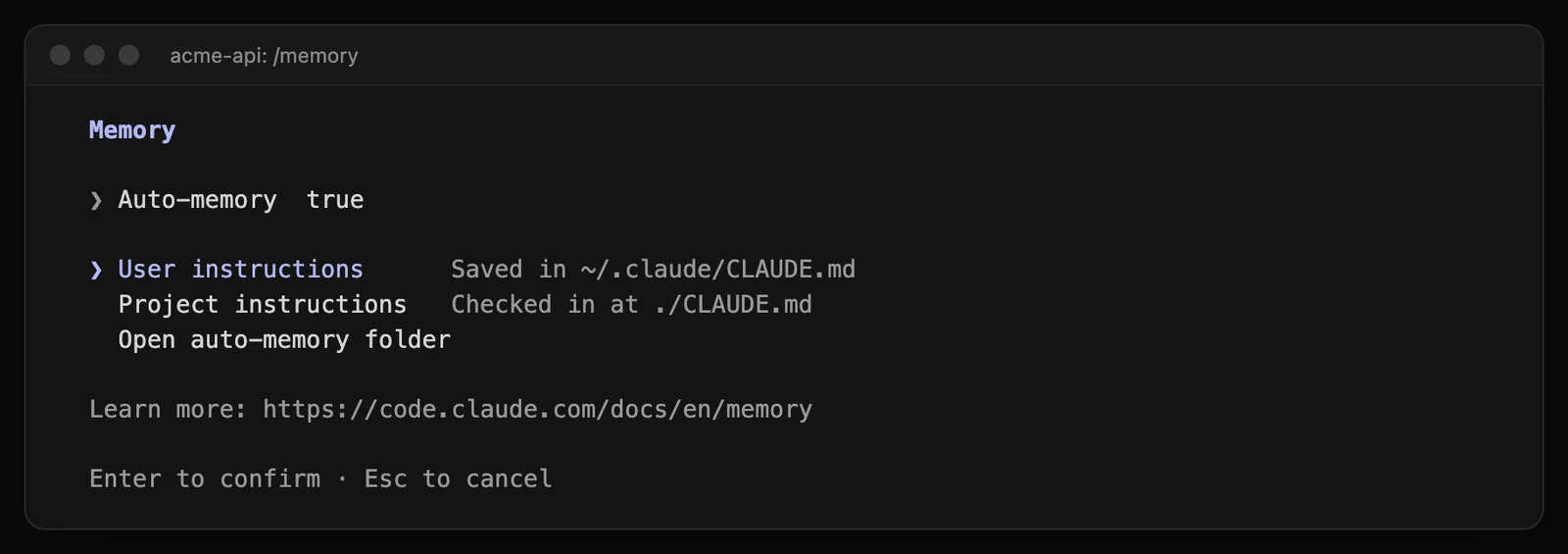
/memory in our demo project: user instructions in ~/.claude/CLAUDE.md, project instructions in ./CLAUDE.md, and auto memory on.
You can also just ask: "add this to CLAUDE.md" makes Claude edit the file, while "remember that…" saves to auto memory instead.
A good CLAUDE.md, by example
Here is a compact, realistic file for a web application. Every line is something Claude would otherwise get wrong or have to rediscover:
# acme-web

Nuxt 4 + TypeScript storefront. pnpm, never npm.

## Commands
- `pnpm dev` starts on localhost:3000 (needs `.env`, copy `.env.example`)
- `pnpm test` runs Vitest; `pnpm test path/to/file` for one file
- `pnpm lint --fix` before every commit

## Conventions
- Components in `components/<area>/Name.vue` auto-import as `<AreaName>`
- All user-facing copy lives in `i18n/locales/{sv,en,de}.json`; keep the three in key parity
- No em dashes in copy

## Gotchas
- Changes to `nuxt.config.ts` need a dev server restart; HMR misses them
- `vite.optimizeDeps.include` must keep `@unovis/ts`, or charts crash at init
- Never edit `../legacy-site`; it is the old site, kept for reference

## Workflow
- Branch, PR, wait for the preview deploy to pass, then merge
- See @docs/deploy.md for the release checklist
What makes it work:
- Commands Claude cannot guess, including the flag for running one test file.
- Conventions that differ from the default, stated as rules ("pnpm, never npm"), not preferences.
- Gotchas, the things that cost someone an afternoon. These are the most valuable lines in any
CLAUDE.md. - Concrete and checkable wording. "Run
pnpm lint --fixbefore every commit" can be followed; "keep the code tidy" cannot. - Headings and bullets, which Claude scans as easily as you do.
What to put in, and what to leave out
Anthropic's advice is to add a line when Claude makes the same mistake twice, when a code review catches something about the codebase Claude could not have known, or when you find yourself typing the same correction again.
| Put in | Leave out |
|---|---|
| Build, test and lint commands | Anything Claude learns by reading the code |
| Conventions that differ from the defaults | A full directory listing or dependency list |
| Gotchas and known traps | Long architecture essays |
| Branch, PR and release workflow | Step-by-step procedures (make them skills) |
| Where things live that are hard to find | Rules for one folder only (make them path-scoped rules) |
| "Always" and "never" rules | Secrets, keys and passwords |
Keep it under about 200 lines. Every line costs context in every session, and a long file gets followed less reliably, not more. /doctor prompt-audit reviews your instruction files for outdated or conflicting content.
Imports with @
A CLAUDE.md can pull in other files with @path:
See @README.md for the project overview and @package.json for available scripts.

# Team workflow
- Git conventions: @docs/git-instructions.md
Relative paths resolve from the importing file, imports can nest up to four levels deep, and @ inside code spans or code blocks is ignored. The first time a project imports a file outside the working directory, Claude Code asks you to approve it.
Imports organize the file; they do not make it cheaper. An imported file loads in full along with the file that imports it. To load guidance only when it is relevant, use path-scoped rules.
Path-scoped rules in .claude/rules/
For larger projects, split instructions into topic files in .claude/rules/. Every .md file there is picked up automatically. A file without frontmatter loads at launch like CLAUDE.md. A file with paths frontmatter loads only when Claude works on a matching file:
---
paths:
  - "src/api/**/*.ts"
---

# API rules
- Every endpoint validates input with the shared zod schemas in src/api/schemas
- Return errors as { error: { code, message } }, never a bare string
This is how a big repository stays lean: the API rules cost nothing while Claude is working on the frontend. paths is the only frontmatter field Claude Code reads here. Personal rules for every project can go in ~/.claude/rules/.
CLAUDE.local.md: your private notes
CLAUDE.local.md sits next to CLAUDE.md and loads after it, but is meant for you alone: your sandbox URLs, a test account, the way you like summaries written. Add it to .gitignore. Anything the whole team should know belongs in CLAUDE.md instead.
Auto memory: notes Claude writes itself
Alongside the files you write, Claude Code keeps auto memory: a folder per project at ~/.claude/projects/<project>/memory/, with a MEMORY.md index and one file per topic. When you correct Claude ("we never deploy on Fridays") or ask it to remember something, it writes a note there and reads it in later sessions.
- It is on by default and stays on your machine. Worktrees and subfolders of the same repository share one memory.
- Only the first 200 lines or 25 KB of
MEMORY.mdload at start; topic files load when needed. - Turn it off in
/memory, with"autoMemoryEnabled": falsein settings, or withCLAUDE_CODE_DISABLE_AUTO_MEMORY=1.
The split is simple: team knowledge goes in CLAUDE.md, where it is reviewed and versioned; personal, learned preferences go in auto memory.
CLAUDE.md and AGENTS.md
AGENTS.md is the shared convention used by Codex and other agents. Current Claude Code versions read it too, with one rule: by default, Claude reads AGENTS.md only when there is no CLAUDE.md or CLAUDE.local.md in the working directory or above. Your user file, a managed file and .claude/rules/ do not count; they load alongside AGENTS.md.
If your team uses both Claude Code and Codex, the recommended setup is a short CLAUDE.md that imports the shared file and then adds Claude-specific notes:
@AGENTS.md

## Claude Code
- Use plan mode for changes that touch more than one package
A symlink (ln -s AGENTS.md CLAUDE.md) also works, but Claude's edit tools will not write through it and it causes trouble on Windows checkouts, so the import is the safer choice. You can change the behaviour under Project instructions in /config. For the Codex side, see the best Codex skills, and for how the two agents differ, Claude Code vs Codex.
Limits, compaction and monorepos
- Size. A file over 4 MiB is skipped entirely. Subdirectory files and path-scoped rules have a per-file character limit (40,000 characters with a 200K context window, more with 1M), and Claude only sees the start of a file over the limit. Claude Code warns about oversized files at startup and in
/status. - Compaction. After
/compact, Claude re-reads the project-rootCLAUDE.mdfrom disk and injects it again. Nested files and path-scoped rules come back when Claude touches matching files. Instructions you only typed in the conversation can be lost, so move the important ones into the file. - Monorepos. If a parent folder's
CLAUDE.mdbelongs to another team, skip it withclaudeMdExcludesin your settings:
{
  "claudeMdExcludes": ["**/monorepo/CLAUDE.md", "/home/user/monorepo/other-team/.claude/rules/**"]
}
- Extra directories.
--add-dirgives Claude access to another folder but does not load itsCLAUDE.md. SetCLAUDE_CODE_ADDITIONAL_DIRECTORIES_CLAUDE_MD=1to load it too.
CLAUDE.md, hooks, skills or settings?
CLAUDE.md is one of four places to tell Claude how to work, and putting a rule in the wrong one is the most common reason it "gets ignored":
| You want | Use | Why |
|---|---|---|
| Facts and conventions for every session | CLAUDE.md | Always in context, cheap to write |
| Guidance for one part of the codebase | .claude/rules/ with paths | Loads only when relevant |
| A multi-step procedure ("how we release") | A skill | Loads only when the task needs it |
| Something that must happen every time | A hook | Runs as code, not as advice |
| Something that must never happen | A deny rule or a PreToolUse hook | Enforced, in every permission mode |
If Claude keeps breaking a rule in CLAUDE.md, that is the signal to turn it into a hook or a permission rule. Our guide to --dangerously-skip-permissions, auto mode and permission rules covers both. One useful side effect: auto mode's safety classifier reads CLAUDE.md too, so describing your environment there ("deploys go through GitHub Actions, never from a laptop") helps it judge what is normal.
When Claude ignores CLAUDE.md
- Run
/context. Is the file listed? ACLAUDE.mdin a subfolder only loads once Claude touches that folder. - Run
/memory. Check which files apply and whether an excluded orAGENTS.mdsetting is in play. - Look for contradictions between your user file, the project file and rules. Claude may pick either.
- Make vague rules concrete. "Use 2-space indentation" works; "format code properly" does not.
- Trim. If the file has grown past 200 lines, the rule you care about may be buried.
- Escalate. If it still matters every time, make it a hook.
For teams: CLAUDE.md as shared policy
A committed CLAUDE.md is the cheapest way to make every developer's agent behave the same way. At company level, a managed CLAUDE.md gives every session the same guidance (data handling, which systems are off limits, how to label AI-written code), while managed settings enforce what must not be optional, such as deny rules and the sandbox. Guidance goes in the file; enforcement goes in settings.
Walma AI Hub takes the same idea across the whole company: every employee gets Claude and other models through one gateway in your own EU region, with shared skills, MCP connections, per-team model access and a full audit log. See how it works, or book a 20-minute walkthrough below. New to Claude Code? Start with how to use Claude Code.
Frequently asked questions
What is a CLAUDE.md file?+
CLAUDE.md is a Markdown file of instructions that Claude Code loads into context at the start of every session: build and test commands, conventions, project layout and gotchas. It is how knowledge survives between sessions. Claude treats it as context it usually follows, not as enforced configuration.
Where should I put CLAUDE.md?+
Put the team's file in the repository root as ./CLAUDE.md (or ./.claude/CLAUDE.md) and commit it. Personal instructions for every project go in ~/.claude/CLAUDE.md, and personal notes for one project in ./CLAUDE.local.md, which you add to .gitignore. Organizations can also deploy a managed CLAUDE.md that every session loads.
How do I create a CLAUDE.md file?+
Run /init in Claude Code from the root of your project. It analyzes the codebase and drafts a CLAUDE.md with build commands, test instructions and conventions; if a file already exists it suggests improvements instead. Then edit it by hand and keep only what Claude cannot work out by reading the code.
How long should CLAUDE.md be?+
Anthropic recommends keeping each CLAUDE.md under about 200 lines. Longer files cost context in every session and are followed less reliably. Move area-specific guidance into path-scoped rules in .claude/rules/ and multi-step procedures into skills.
Does Claude Code read AGENTS.md?+
Yes, in current versions. By default Claude Code reads AGENTS.md only when there is no CLAUDE.md or CLAUDE.local.md in the working directory or above. If you need both, the recommended pattern is a CLAUDE.md whose first line is @AGENTS.md, followed by Claude-specific instructions. You can change the behaviour under Project instructions in /config.
What is the difference between CLAUDE.md and auto memory?+
You write CLAUDE.md; Claude writes auto memory. Auto memory is a folder per project under ~/.claude/projects/ with a MEMORY.md index and topic files that Claude adds to when you correct it or ask it to remember something. It stays on your machine, while a project CLAUDE.md is shared with the team through git.
Is CLAUDE.md still used after /compact?+
Yes. After compaction Claude re-reads the project-root CLAUDE.md from disk and injects it again. Nested CLAUDE.md files in subdirectories and path-scoped rules load again on demand when Claude touches matching files. Instructions you only gave in the conversation can be lost, which is a good reason to move them into CLAUDE.md.
Why does Claude ignore my CLAUDE.md?+
Check /context to see whether the file was loaded at all, and /memory to see which files apply. Common causes are a file in a subdirectory that only loads when Claude touches that folder, contradicting instructions, vague rules such as 'write clean code', or a file so long that the important lines get lost. Anything that must happen every time belongs in a hook, not in CLAUDE.md.
The same tools, in your EU region, under your control
A 20-minute walkthrough with an engineer. We map it to your tools, your MCP servers and your budget model.